
VA Video Connect
US Department of Veterans Affairs (VA)Medical
4.41.95K Reviews
- Version
- 1.12.11
- Installs
- 500.00K
- Age Rating
- Everyone
Screenshots
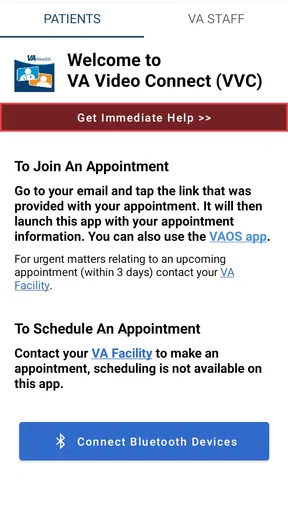
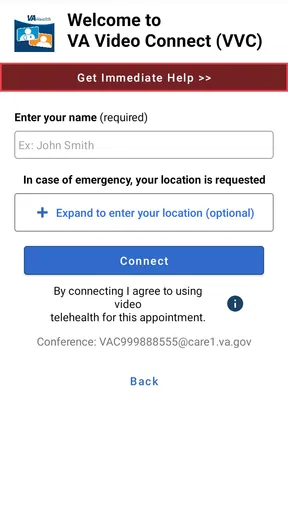
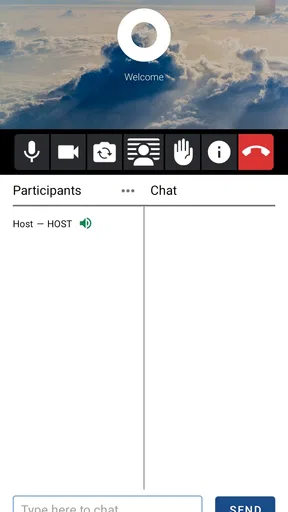
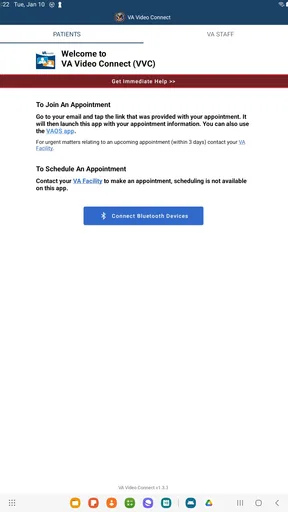
Our Review of VA Video Connect
 Analysis by Appyee
When a VA appointment would normally mean a long drive, VA Video Connect offers a more practical way to meet with your care team from home. I reviewed it as a medical app rather than as a general video-chat tool, and that distinction matters: its usefulness depends less on entertainment features and more on whether your VA provider has arranged a video visit with you.
The app is developed by the US Department of Veterans Affairs and is available free of charge. It is rated for Everyone, runs on devices using at least iOS or Android version 12, and has reached over 500 thousand installs. Its average rating is 4.4 from around 11 thousand ratings, with roughly 1.8 thousand written reviews, so it has clearly become a familiar option for many veterans who need remote contact with VA services.
How VA Video Connect fits into a real appointment
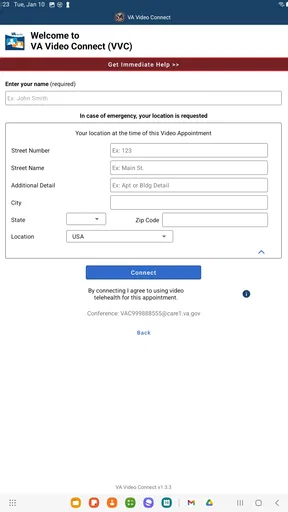
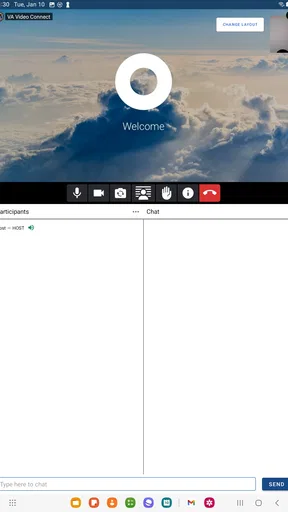
The basic idea is straightforward: your VA care team schedules or provides access to a video visit, and you use the app to join that appointment remotely. This is not a replacement for every kind of medical care, and it is not a general-purpose way to call any doctor you choose. Its value appears when the VA has already connected the visit to its video-care process.
That makes preparation more important than it may seem. Before the appointment, I would make sure the device is charged, the operating system meets the minimum requirement, and the camera and microphone are available. I would also choose a quiet place with enough light on my face. A poor room setup can make a medically useful conversation feel unnecessarily difficult, even when the app itself is working correctly.
A realistic example is a veteran who has a follow-up appointment but lives far from the nearest VA facility. Instead of arranging transportation and spending much of the day traveling, that person can prepare a phone or tablet, open the visit through the VA process, and speak with the care team at home. For routine discussions, medication questions, progress checks, or care planning, that convenience can be more important than having a long list of extra app features.
I also see a useful role for family support. A veteran who is less comfortable with mobile technology may ask a trusted person to help prepare the device before the appointment. The helper can assist with charging, positioning the camera, and checking the connection without needing to take over the medical conversation. That small amount of preparation can reduce stress, especially when the visit is important.
What the free price really means
The app itself is free, which removes one obvious barrier to trying it. I appreciate that the cost of the software does not become another decision for someone already managing appointments, transportation, or treatment. The free access is especially meaningful for veterans who only need video visits occasionally and do not want another subscription-based communication service.
There is an important distinction, though: free app access is not the same as unlimited or independent medical service. The app’s usefulness comes from an appointment or contact arranged through the VA care system. In other words, downloading it does not by itself create a consultation with a clinician. The value is tied to having a VA video visit available to join.
I would also avoid judging it like a paid telehealth platform. There is no purchase decision to optimize inside the app; the practical question is whether it helps you attend the VA appointments you already need. For an eligible veteran with a compatible device and a care team using video visits, free access can deliver substantial practical value. For someone looking for private medical care outside the VA, the same free price does not make it the right tool.
The strongest value is convenience, not complexity
My main positive impression is that the app focuses on a specific problem: reaching a VA care team remotely. That focus can be a strength. General video-chat apps may offer messaging, social calls, screen sharing, filters, and many other tools, but those extras do not automatically make them suitable for a clinical appointment. A purpose-built VA option keeps the user’s attention on joining the planned visit.
The time saved can be significant even when the appointment itself is short. A remote visit may reduce the need to coordinate a ride, take time away from work or caregiving, or travel while dealing with pain or limited mobility. It can also make follow-up care easier to maintain when distance would otherwise encourage postponement.
Another benefit is familiarity across repeated appointments. Once a veteran has learned the basic routine—prepare the device, locate the visit information, enter at the appropriate time, and speak with the care team—the next appointment may feel less intimidating. That repeatable workflow is more valuable than a flashy interface for people who use medical technology under pressure.
Still, I would keep expectations realistic. A video visit cannot provide every hands-on examination, test, procedure, or urgent intervention. If a clinician needs to examine something physically, measure a result with equipment, or respond to an emergency, an in-person or immediate-care option may be more appropriate. The app is best understood as an access channel, not as a complete substitute for the VA healthcare experience.
Small preparation choices make a big difference
One practical tip is to treat the appointment like an in-person visit and prepare a short written list beforehand. I would note current concerns, changes since the last appointment, medication questions, and anything that might be easy to forget once the call begins. Video appointments can feel informal, but the limited time still benefits from structure.
A second tip is to use a stable surface rather than holding the phone throughout the conversation. A shaky camera is distracting, and holding a device can become uncomfortable during a longer discussion. Placing it at eye level also makes it easier for the care team to see the patient clearly. Headphones may help in a noisy home, but I would test them before the appointment instead of introducing unfamiliar equipment at the last minute.
A third useful habit is to keep a backup plan in mind. If the connection becomes unreliable, I would know how to contact the VA team or appointment office through the normal instructions provided for that visit. This is not because the app is necessarily unreliable; it is simply sensible for any important remote appointment. A charged device, a location with dependable connectivity, and a second way to reach the care team can prevent a technical problem from becoming a missed appointment.
It is also worth checking the privacy of the room. A veteran may discuss sensitive health information, so joining from a quiet place where other people cannot overhear is preferable. Public Wi-Fi may be convenient, but a private, trusted connection is usually a better choice for a medical conversation. These are user-side decisions, yet they strongly affect the experience of using a healthcare video app.
Where the experience can be frustrating
The biggest limitation is dependency on the VA appointment workflow. A general video app lets you call a contact whenever you want, while VA Video Connect is useful when the VA has arranged the clinical encounter. Someone who downloads it expecting an open directory of doctors or an instant consultation may be disappointed.
Device compatibility is another practical consideration. The current version is 1.12.10, and the minimum operating system is version 12. That requirement is reasonable for many newer phones and tablets, but people using older hardware may need to update the operating system or use another supported device. I would check compatibility before the day of the appointment rather than discovering the problem when it is time to join.
Video quality also depends on conditions outside the app. Weak connectivity, an overloaded home network, a dim room, or a blocked microphone can make the visit harder. A user may interpret a failed connection as an app problem when the real cause is the device or network. This is why a brief test of the camera, microphone, speaker, and connection is worthwhile before an important appointment.
There is a human limitation as well. Some people communicate more comfortably face to face, while others find video calls tiring or awkward. A veteran with hearing, vision, cognitive, or mobility needs may require additional preparation or an alternative arrangement. The app can support remote contact, but it does not automatically solve every accessibility challenge. If the format makes it difficult to communicate accurately, an in-person option may provide better care.
How it compares with ordinary alternatives
Compared with a regular phone call, video can give the care team more visual context and make the conversation feel more personal. That can help during a follow-up where seeing the patient or demonstrating something on camera is useful. On the other hand, a phone call may be less demanding for someone with limited bandwidth, an older device, or discomfort with cameras.
Compared with a general video-chat service, the VA-focused approach is more relevant to veterans whose care team uses this system. A consumer app may be easier for casual calls with family, but it is not automatically interchangeable with the platform selected for a VA appointment. I would follow the instructions connected to the appointment rather than choosing the familiar app simply because it is already installed.
Compared with traveling to a VA facility, remote video is usually more convenient for suitable appointments, but the facility remains the better choice when an examination, testing, treatment, or hands-on assessment is needed. The trade-off is clear: less travel and easier access in exchange for a format that cannot reproduce every part of an in-person visit.
Who is most likely to benefit
I think the app is a strong fit for veterans who already have VA video appointments, own a compatible Android or iOS device, and value avoiding unnecessary travel. It is particularly useful for people living far from care, those with transportation difficulties, and anyone who finds routine follow-ups easier to manage from home.
It can also suit caregivers who help a veteran prepare for remote appointments. The most helpful support is often simple: making sure the device is updated, setting it somewhere stable, checking the audio, and helping the patient keep notes nearby. Once the routine is established, the veteran may be able to handle future visits with less assistance.
I would be more cautious if your main need is urgent medical attention, physical treatment, diagnostic testing, or a service outside the VA system. The app should not be treated as an emergency channel or as a universal telemedicine marketplace. If you are unsure whether a concern is appropriate for video, contact the relevant VA service using the instructions associated with your care rather than relying on the app alone.
People with very old devices, unreliable internet, or no private place for medical conversations may also get less value from it. In those situations, a phone appointment or in-person visit could be more dependable. The free price makes trying the app low-risk, but convenience only exists when the surrounding setup works.
My recommendation after weighing the trade-offs
For the right user, I would recommend installing VA Video Connect before the first scheduled video appointment and becoming familiar with the device setup in advance. The app’s value is practical rather than flashy: it can make contact with a VA care team easier, reduce travel, and support more consistent follow-up when video is clinically suitable.
I would not recommend it as a standalone replacement for every form of healthcare, and I would not choose it merely because it is free. Its usefulness depends on a VA video visit, a compatible device, and a connection good enough for clear communication. Those conditions are manageable for many people, but they should be considered honestly.
The developer, US Department of Veterans Affairs, has made a focused medical tool rather than a broad communication platform. That focus is exactly why it can be valuable to veterans using VA remote care, while also explaining why it is not useful for everyone. With the app updated, the camera and microphone tested, and questions prepared beforehand, I think it offers a sensible way to attend appropriate VA appointments from home.
Overall, my verdict is positive for veterans already invited to use video care and neutral for everyone else. There is no purchase cost to weigh, but there is a workflow to follow. If that workflow matches your appointment, the convenience can be genuinely worthwhile; if you need emergency help, hands-on care, or a provider outside the VA system, another route is the better choice.
Privacy and Permissions
See what permissions an app requests and how it handles your data.
- Location
- approximate location (network-based), precise location (GPS and network-based)
- Phone
- read phone status and identity
- Photos/Media/Files
- read the contents of your USB storage, modify or delete the contents of your USB storage
- Storage
- read the contents of your USB storage, modify or delete the contents of your USB storage
- Camera
- take pictures and videos
- Microphone
- record audio
- Device ID & call information
- read phone status and identity
- Other
- view network connections, pair with Bluetooth devices, access Bluetooth settings, control flashlight, full network access, change your audio settings, prevent device from sleeping
Verdict
Strengths of VA Video Connect
- Reliable video meetings for remote work, classes, and personal calls.
- Supports screen sharing for presentations, demonstrations, and collaboration.
- Meeting links make it easy to invite guests without complicated setup.
- Works across mobile devices, helping users join calls while traveling.
- Useful business-focused features suit organizations already using Zoom Video.
Limitations of VA Video Connect
- Some advanced meeting tools may require a paid Zoom subscription.
- Video quality depends heavily on your internet connection and device hardware.
- The interface can feel busy for first-time users.
- Background activity may noticeably affect battery life during long calls.
- Privacy-conscious users may prefer reviewing Zoom’s data and permission settings.
Similar Picks in This Category
View All
WebMD: Symptom Checker
WebMD, LLC4.1

Microphone Amplifier
DOSA Apps4.2

Anatomy Learning - 3D Anatomy
3D Medical OU4.5

Period Tracker and Calendar
SimpleInnovation4.9

GoodRx: Prescription Coupons
GoodRx4.8

CVS Health
CVS Pharmacy4.5
Frequently Asked Questions
What is VA Video Connect, and who can use it?
VA Video Connect is a telehealth application from the U.S. Department of Veterans Affairs that allows eligible veterans to attend secure video appointments with VA healthcare providers. It is mainly intended for veterans with scheduled VA services, although a provider or clinic may send an invitation or instructions before the visit. Availability can depend on your VA facility, appointment type, and regional service coverage.
Do I need a VA account or an invitation to join a video appointment?
In most cases, you need a scheduled VA video appointment and instructions from your healthcare provider or VA facility. Depending on the appointment setup, you may join through a provided link, enter meeting information, or use an authenticated VA service. Before downloading, check the appointment message carefully, because having the app alone does not create an appointment or guarantee access to every VA telehealth service.
What devices and internet connection are required for VA Video Connect?
VA Video Connect generally requires a compatible Android or iOS device with a working camera, microphone, speakers, and a reasonably stable internet connection. Wi-Fi is usually preferable for longer appointments, while mobile data may work if the signal is strong. You should also keep the operating system and application updated, close unnecessary apps, and test your camera and microphone before the scheduled visit.
Is VA Video Connect secure and private for medical appointments?
VA Video Connect is designed for VA healthcare communication and uses security measures intended to protect telehealth sessions and patient information. However, privacy also depends on how and where you use the service. Join from a quiet, private location, avoid public Wi-Fi when possible, do not share appointment links, and confirm that you are communicating through official VA instructions rather than an unexpected message.
What should I do if I cannot connect or the video appointment does not work?
If the appointment fails, first check your internet connection, confirm that the app has permission to use the camera and microphone, restart the application, and try joining again from the original VA instructions. Headphones can help with audio feedback. If the problem continues, contact your VA clinic or the support contact provided with the appointment, since the clinic can explain alternative attendance options or reschedule the visit.
